
Software Defined Radio RTL-SDR SDR DAB FM
Software Defined Radio RTL-SDR SDR DAB FM
Couldn't load pickup availability
Software Defined Radio, SDR, Receiver. USB 2.0 Digital DVB-T DAB FM Tuner Radio Receiver Stick RTL2832 + Rafael Micro R820T-family tuner.
Turn your PC into a wideband radio receiver. Explore FM, aircraft tracking, weather satellites and more — all with a simple USB device.
Brand new RTL2832 (aka RTL2832U) RTL-SDR R820T USB dongle. Can be used as a Software Defined Radio (SDR) scanner.
The Realtek RTL2832U outputs 8-bit I/Q samples at a maximum theoretical sample rate of 3.2 MS/s. Lower sample rates may be required to avoid dropped samples, depending on the computer and USB connection. This receiver uses a Rafael Micro R820T-family tuner, with a typical SDR tuning range of approximately 24–1766 MHz. Actual frequency coverage depends on the software and receiver implementation.
The receiver uses a male USB 2.0 Type-A plug, so desktops and older laptops with full-size USB-A ports are the most straightforward fit. USB-C-only laptops, tablets, mini PCs, or newer ultrabooks will usually need a suitable USB-C to USB-A adapter or dock. Power is supplied by USB, so no external power supply is listed for normal use.
Compatibility summary
✓ Windows 11 compatible for SDR use
✓ Windows 10 compatible for SDR use
✓ Software can be downloaded - CD-ROM drive not required
✓ USB-A device; USB-C computers need a USB-C to USB-A adapter
⚠️Driver/software setup required; not plug-and-play
Features:
• Time-shifting.
• Remote control.
• Support Teletext.
• Scheduled recording.
• Still image snapshots.
• Support multi-picture display.
• Support Microsoft BDA drivers.
• Support Windows 2000/XP/Vista/WIN7/8.
• Support EPG (Electronic Program Guide).
• Full DVB-T bandwidth reception (6/7/8 MHz).
• Support both MPEG-2, MPEG-4(H.264) encoding.
• Digital TV recording and playback as DVD quality.
• Watch and record digital terrestrial TV on PC or Laptop.
• Watch DVB-T digital TV and listen to DAB+ digital +FM +SDR radio.
Note: The connector type on the antenna and USB board is MCX.
System requirements:
Operating system compatibility: Windows 11 / 10 for SDR use with downloadable SDR software. Windows 8 / 7 may also work with compatible SDR software. macOS and Linux use may be possible with third-party SDR applications.
CD-ROM drive: Not required for SDR use.
Software: Downloadable SDR software and driver setup required.
USB connection: USB 2.0 Type-A. USB-C computers require an adapter.
Technical Specifications:
Colour: Black
Sold as: Each
Condition: New
Packaging: Bulk
Power: USB powered
USB Interface: USB 2.0
Max sample rate~3.2 MSPS
Product Code: USB-RTLSDR-NZ
Product Category: Radio Tuners
Tuner: Rafael Micro R820T-family tuner
ADC (Analog-to-Digital Converter): 8-bit
Product Type: USB Software Defined Radio (SDR) Receiver
Chipset: Realtek RTL2832U + a Rafael Micro R820T-family tuner
Applications: FM Radio, ADS-B, Weather Satellites, DVB-T, Amateur Radio
Typical SDR tuning range: approximately 24–1766 MHz, depending on software and receiver implementation
USB Connector: Male USB 2.0 Type-A Plug Connector.
Antenna Connector: Female Snap-on MCX (micro coaxial connector) Coaxial RF Socket Connector.
Dimensions:
USB Receiver Stick Dimensions: 88 mm (length) x 37 mm (width) x 13 mm (thickness)
Antenna Height: 150 mm (including magnetic base)
Antenna Base Diameter: 30 mm
Antenna Cable Length: 1150 mm
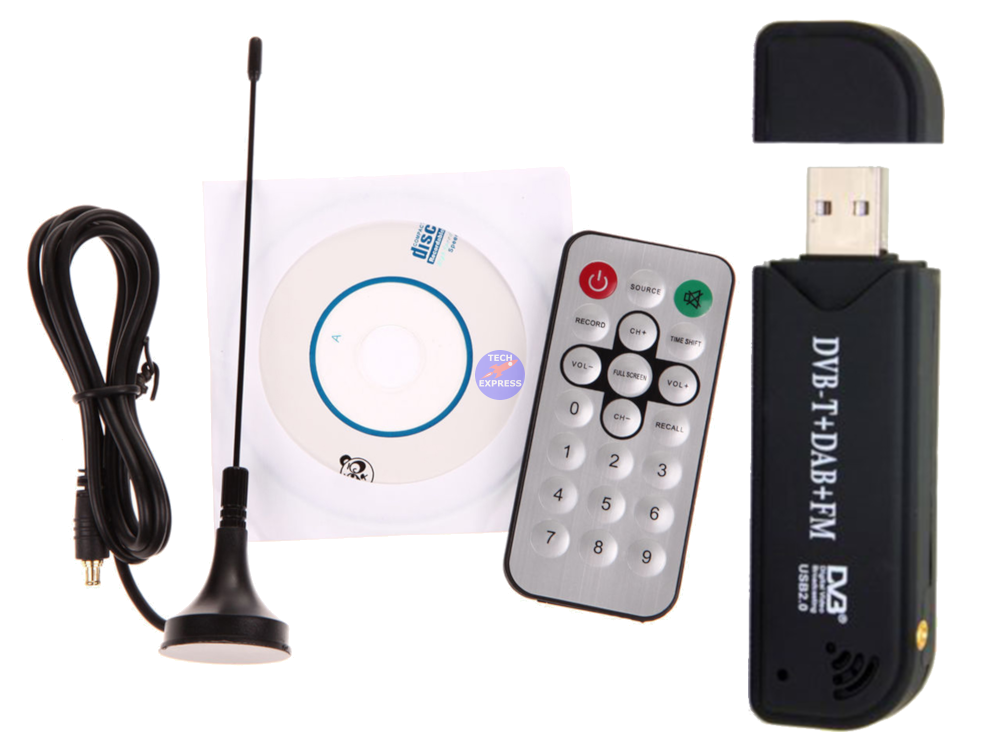
Package includes:
1x Software Defined Radio (SDR) receiver
1x Antenna, antenna cable and base
1x Remote controller
1x Mini CD ROM
Please note we do not provide support. A huge resource of Software Defined Radio and SDR documentation can be found on the internet.
Warranty & Returns:
14 Day 'change of mind' return in unused condition for refund less shipping fees
90 Day return to base refund or replace guarantee
People also search for: rtl-sdr dongle, usb sdr receiver, rtl2832u receiver, software defined radio usb, dvb-t usb tuner, dab fm usb receiver, radio scanner usb, rtl-sdr antenna, mcx antenna adapter, sdr usb tuner.
Installation Hints, Tips and Troubleshooting:
📺 YouTube: Getting started with SDR# and an RTL SDR tuner - https://youtu.be/IaKEYEyrRgk
📘 RTL SDR Quick Start Quide (rtl-sdr.com) - https://www.rtl-sdr.com/rtl-sdr-quick-start-guide/
💾 Airspy SDR Software Download (airspy.com) - https://airspy.com/download/
💾 SDR Console Download - https://www.sdr-radio.com/console
📘 Run RTL SDR Android Apps on an Android TV Box - https://www.rtl-sdr.com/running-rtl-sdr-android-apps-on-an-android-tv-box/
💿 Don't have a compatible CD-ROM drive? No problem! You can download the contents of the included mini CD-ROM directly here: Download RTL-SDR CD-ROM Contents (.zip) (65 MB). This is an archival copy of the driver and software disc supplied with the receiver for customers whose computers do not have an optical drive. It contains legacy Windows software that may not be suitable for every current Windows installation.
Frequently Asked Questions (FAQs):
Q: Will this work with Windows 11?
A: Yes, for SDR use it can be used with Windows 11 when paired with compatible downloadable SDR software such as SDR# or SDR++. Driver setup may be required.
Q: Do I need a CD-ROM drive?
A: No. A CD-ROM drive is not required for normal SDR use. The included mini CD is legacy bundled media; current SDR software and drivers can be downloaded online. You can also download the contents of the included mini CD-ROM directly here: Download RTL-SDR CD-ROM Contents (.zip)
Q: Is it plug-and-play?
A: No. RTL-SDR receivers usually require SDR software and driver setup before use.
Q: Will it work with USB-C computers?
A: The receiver has a USB-A plug. USB-C-only computers will need a USB-C to USB-A adapter or dock.
We welcome & answer all questions.
Product questions & answers
Understand how this product works and whether it suits your setup. Have a question? Our team reviews and emails answers 24/7—typically within 1–2 hours.