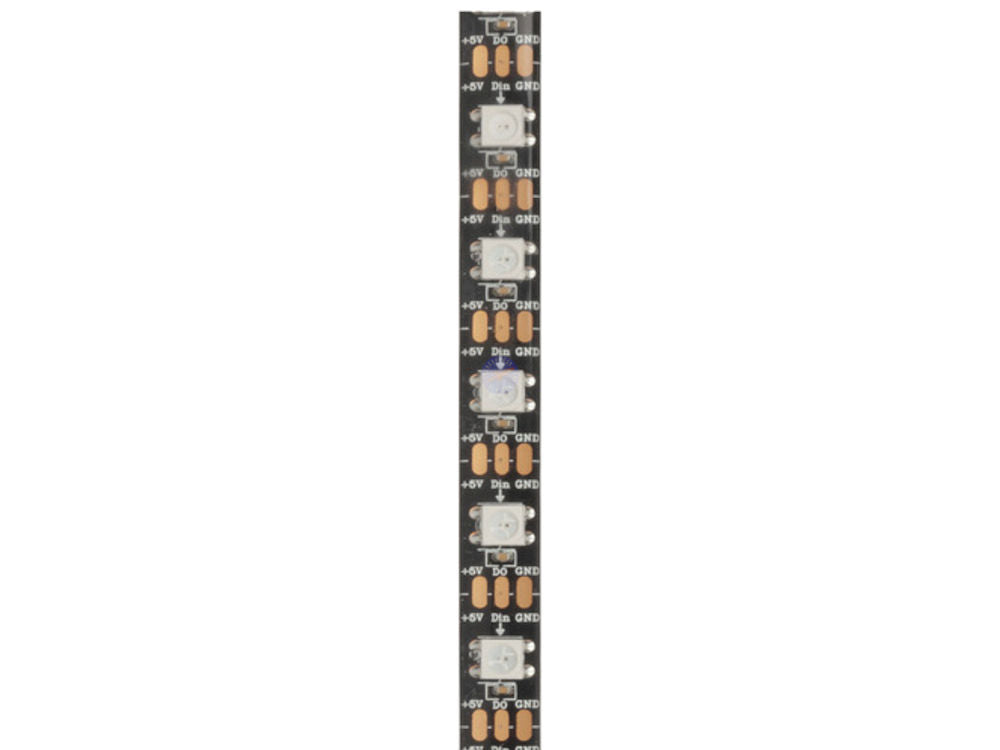
2M RGB LED Strip with 120 x Addressable W2812B RGB LEDs Arduino/MCU Compatible 5V
2M RGB LED Strip with 120 x Addressable W2812B RGB LEDs Arduino/MCU Compatible 5V
Couldn't load pickup availability
2M RGB LED Strip with 120 x Addressable W2812B RGB LEDs Arduino/MCU Compatible 5V.
Add amazing colour to your next microcontrollor project with 120 RGB LEDs.
A 2m long flexible LED strip light with 120 addressable WS2812B RGB LEDs to create amazing lighting displays using your favourite microcontroller. Power from 5V. IP65 water resistant rating.
Features:
• 5V.
• 2m Length.
• IP65 Rated.
• Flexible and Waterproof.
• 120 x Addressable W2812B RGB LEDs.
Specifications:
Length: 2.0m.
IP Rating: IP65.
Dust/Particle Ingress Protection : 6 - Dust tight, no ingress of dust.
Liquid/Moisture Ingress Protection : 5 - Water jets.
Installation Hints, Tips and Troubleshooting:
This strip contains 120 individually addressable WS2812B RGB LEDs which can be activated using the neopixel protocol.
Looking at the end of the strip, you can find 3 connections: 5V, DIN, and GND. These are connected as follows:
LED Strip : UNO
5V: 5V
DIN: (any PWM pin) such as pin 6.
GND: GND
Furthermore, the LED strip can be cut and re-attached at lengths, via cutting through any of the vertical lines that cross over the pads which separate DO to DIN. The strip operates on the principle of the “Data Out” of one strip goes into the “Data In” of the next strip, and the microcontroller provides the initial “Data In”.
The following is from the WS2812B datasheet, which can be found on through the internet. For a simple strip of 3 lights, the first LED gets 3x RGB data, which it will “consume” the first bunch, and “pass on” the remaining 2. Then, the second LED will receive 2x RGB data, consume one, and pass on the remainder. This is all managed by the neopixel library.
Software setup: To set up this strip using the arduino ecosystem, you must install the “NeoPixel” library by Adafruit.
The following code presumes that you have the first DIN pin connected to pin 6 on the Arduino.
#include <Adafruit_NeoPixel.h>
#define LED_PIN 6
#define LED_COUNT 120
Adafruit_NeoPixel strip(LED_COUNT, LED_PIN, NEO_GRB + NEO_KHZ800);
void setup() {
strip.begin(); //always needed
strip.show(); // 0 data => off.
strip.setBrightness(50); // ~20% (max = 255)
}
void loop() {
int n = strip.numPixels();
// fph = FirstPixelHue
for (long fph = 0; fph < 5 * 65536; fph += 256)
{
for (int i = 0; i < n; i++)
{
int pixelHue = fph + (i * 65536L / n);
strip.setPixelColor(i,
strip.gamma32(strip.ColorHSV(pixelHue))
);
}
strip.show();
delay(10);
}
}