


Wired PS2 Controller with Vibration Feedback
Wired PS2 Controller with Vibration Feedback
Couldn't load pickup availability
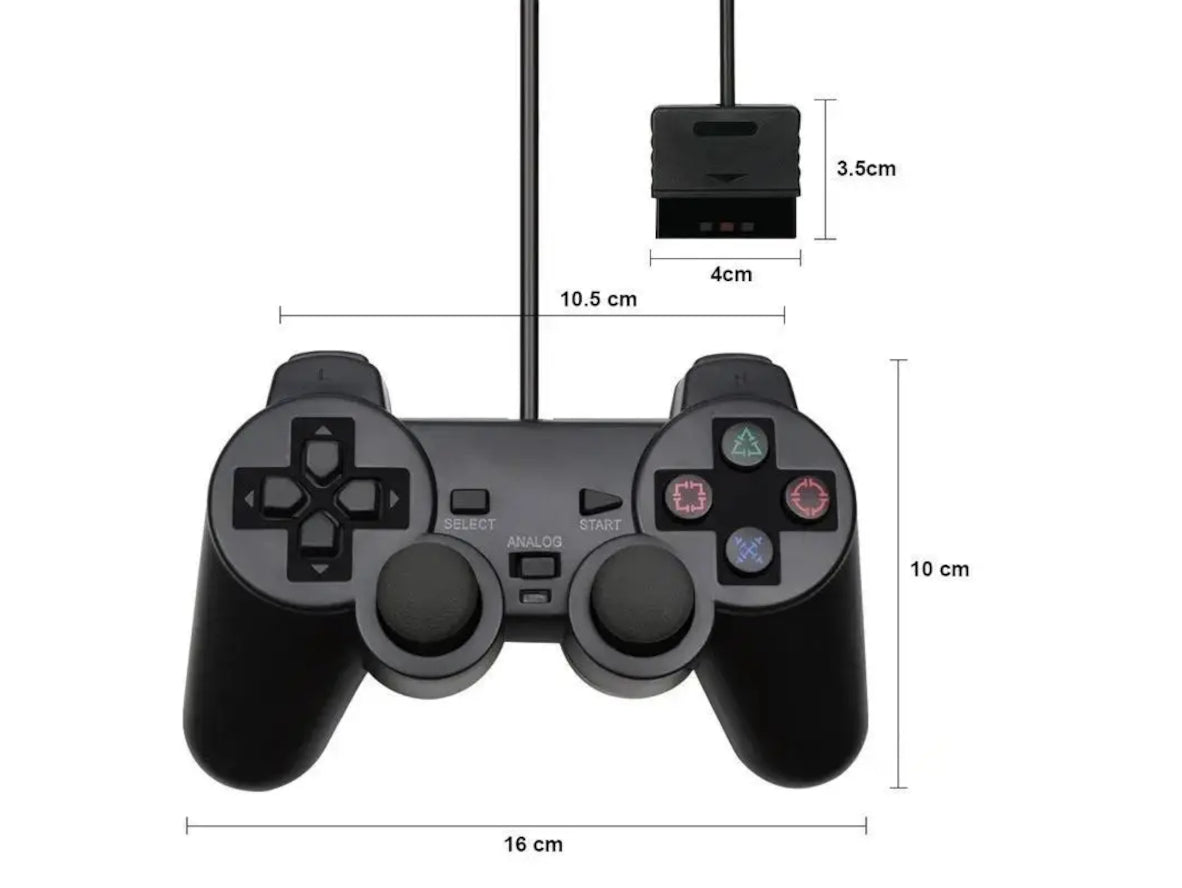
Wired black joystick game controller for Sony PlayStation 2 PS2 with dual analogue thumbsticks and vibration feedback.
This PS2 game controller is an ideal joystick for enjoying video games on your classic ps2 PlayStation video game console.
Guaranteed reliability. This wired PS2 controller includes a 1-Year Techexpress New Zealand Guarantee.
• Plug and play
• 100% brand new
• 2x analogue thumbsticks
• Vibration feedback feature
• 1.4 Meters of controller cable
• Left and right shoulder buttons
• Independent controller keys, compatible with PS2
• Backwards compatible with Sony PlayStation 1 PS1
• Ergonomic design enables maximum comfort for endless gameplay
Using a large TV? We highly recommend adding a PS2 Controller Extension Cable for extra reach.
Technical Specifications:
• Platform: Sony PlayStation 2 and original PlayStation 1 compatible use
• Product Type: Third-party wired game controller for PlayStation 1 and PlayStation 2
• Connectivity: Wired
• Cable Length: Approximate 1.4 metres
• Controller Dimensions: 157 × 95 × 55 mm
• Weight: 219 grams
• Vibration Feedback: Yes
• Analogue Sticks: Dual analogue thumbsticks
• Interface: Proprietary PlayStation 1 & 2 controller port connector
• Colour: Black
• Material: ABS plastic
• Condition: New
• Sold as: Each
• Packaging: Bulk
• Stock unit: Each
• Product Code: PS2-CONTROLLER-BLACK-NZ
• Applications: PlayStation 2 gaming, original PlayStation compatible gaming, replacement controller use
Package Includes:
1x Game controller joypad for the Sony PlayStation 2 PS2.
Combine & Save: Explore our range of Sony PlayStation 2 cables, parts and accessories.
*This generic, replacement, third-party DualShock 2 style PS2 controller is not made by Sony. Sony is a registered trademark of Sony Group Corporation. TECHEXPRESS NZ LIMITED is neither affiliated with nor approved by Sony. The image is for illustrative purposes only. Due to variations in camera settings, lighting, manufacturing processes, monitors, and supply, colours may differ. Product appearance and specifications are subject to change without notice.
People also search for: PlayStation 2 controller NZ, PS2 wired controller NZ, wireless PS2 controller NZ, DualShock 2 controller NZ, cheap PS2 controller NZ, PS2 controller for PC NZ, PS2 multitap NZ, best PS2 controller NZ, replacement PS2 controller NZ, PS2 classic controller NZ.
Warranty & Returns:
14 Day 'change of mind' return in unused condition for a refund less shipping fees.
1 Year return to base refund or replacement guarantee.
Frequently Asked Questions (FAQs):
Q: Is this PS2 controller compatible with all PS2 models? Yes, this PS2 Game Controller is compatible with all models of the PlayStation 2 console.
Q: Does this controller have vibration feedback? Yes, it includes vibration feedback to enhance the gaming experience.
Q: Can I use this controller on a PC? Yes, with a PS2 to USB adapter, this controller can be used on a PC for emulation or other compatible games. The PS2 to USB adaptor is sold separately. See https://www.techexpress.co.nz/products/ps2-controller-to-usb-adapter
Q: What is the cable length of this controller? The controller comes with a cable approximately 1.4 meters (4.6 feet) long. Please note that this is shorter than the original Sony cables. For living room setups where the console is far from the seating area, we highly recommend our PS2 Controller Extension Cable.
Q: Is this a genuine Sony product? This is a third-party replacement controller for PS2 and PS1-compatible use. It is not an original Sony controller, and physical size, weight, plastics, button feel, cable length, and ergonomics may differ from genuine Sony controllers.
Q: What should I do if the controller isn't working properly? Ensure it's properly connected to the console, and if issues persist, try testing it on another console or checking for any visible damage.
Installation Hints, Tips and Troubleshooting:
Wired PS2 Controller Setup and Troubleshooting
This controller is compatible with Sony PlayStation 2 and original PlayStation / PS1 consoles. It is a wired, plug-and-play, third-party controller with dual analogue thumbsticks, vibration feedback, and a proprietary PS2 connector. For PC use, a separate PS2 to USB adapter is required.
⚠️ IMPORTANT: Start with the simple checks first
Most controller issues are caused by connection, controller mode, game settings, or a console-side problem rather than an immediate controller failure. Sony’s PlayStation 2 documentation confirms that analogue and digital modes behave differently, and that some games handle mode selection automatically.
🔌 1. Basic installation
• Insert the controller plug carefully and fully into the controller port
• Make sure the connector is straight and seated firmly
• Power on the console and test the controller in a menu or game screen where button input is easy to confirm
• If there is no response, test the controller in the other controller port as well
⚠️ IMPORTANT: Do not force the connector into the port. If it does not seat properly, remove it, check the alignment, and try again.
🎮 2. Check analogue mode
If your controller has an ANALOG button, test both modes before assuming there is a fault.
• If the D-pad works but the thumbsticks do not, switch to analogue mode
• If the thumbsticks seem inactive or inconsistent, test both digital mode and analogue mode
• Some games adjust controller mode automatically, so behaviour can vary from one title to another
Sony states that the analogue sticks function only in analogue mode, and that in digital mode the left and right analogue sticks do not function.
🕹️ 3. If the thumbsticks feel unresponsive
Before testing again:
• Rotate each thumbstick gently through a full circle once or twice
• Do not twist the sticks forcefully
• Re-test movement in a compatible game
Sony specifically advises rotating the analogue sticks once with the console turned on, using a circular motion rather than twisting them.
💥 4. If vibration feedback is not working
If the controller works but there is no rumble:
• Open the game’s options menu and confirm vibration is enabled
• Test the controller in another game that supports vibration
• Do not assume lack of vibration means the controller is faulty
Sony’s PlayStation 2 documentation states that vibration can be turned on or off in the software options menu, and that some games may enable it automatically.
🔍 5. If the controller does not respond at all
Use this fault-isolation sequence:
• Test the controller in both controller ports
• Try another known-working controller on the same console
• Inspect the plug for dirt, bent contacts, or visible damage
• Check the cable for cuts, crushing, or severe kinks
• Test the controller in more than one game if possible
⚠️ IMPORTANT: If another controller works correctly on the same console, but this one does not, the controller is the likely cause.
This matches the troubleshooting direction already given on the product page, which recommends checking the connection, trying another console, and looking for visible damage if problems persist.
🔁 6. If the controller works intermittently
Intermittent problems usually point to a loose connection, worn cable, or connector issue.
• Re-seat the connector firmly
• Avoid sharply bending the cable while testing
• Check whether input drops out when the cable is moved
• Inspect the console port for looseness, dust, or visible damage
⚠️ IMPORTANT: If the controller only works when the cable is held at a certain angle, the cable or connector may be damaged.
🧩 7. If you are using it on a PS1
This controller is compatible with Sony PlayStation 2 and original PlayStation / PS1 consoles.
• If control response seems inconsistent, test both controller modes where applicable
• Try more than one game if possible
• Be aware that control behaviour can vary depending on the software being used
Sony’s manual notes that control behaviour in analogue mode can differ between PlayStation 2 format software and original PlayStation format software.
🖥️ 8. If you are trying to use it on a PC
This is not a native USB controller.
• A PS2 to USB adapter is required for PC use
• If the controller does not work when plugged directly into a PC without an adapter, that is expected
• PC compatibility can also depend on the adapter and software being used
✅ 9. Recommended quick test sequence
For the fastest diagnosis, use this order:
• Test the controller in both PS2 controller ports
• Test both digital and analogue mode
• Check vibration settings inside the game
• Try another controller on the same console
• Try this controller on another compatible console if available
This sequence is the most practical way to separate a faulty controller from a console, port, cable, or game-setting issue. It is also consistent with Sony’s mode guidance and the troubleshooting advice already provided on the product page.
📌 10. When it is reasonable to stop troubleshooting
If you have tested both controller ports, confirmed another controller works on the same console, checked the plug and cable, and tried the correct controller mode, it is reasonable to treat the unit as faulty.
This product includes a 1-Year Techexpress New Zealand Guarantee and a 1 Year return-to-base refund or replacement guarantee.
We welcome & answer all questions.


Questions & Answers
Have a Question?
-
Will your ps2 controllers work in a ps1?
Hi. Thanks for your question. These PS2 controllers are also compatible with the original Sony PlayStation console, which is also known as PS, PS1, PSone, PS One and PSX. Please let us know if you have any other questions.
-
Do you still have ps2 controller please
Hi. Thanks for your question. We currently have many of these PS2 controllers in stock here in New Zealand for immediate dispatch.
-
Still Available?
Hi, thanks for asking! Yes, the PS2 controllers are in stock.